Workflow automation
Automate routine data transfers, reminders and checks with agreed rules. Your team handles decisions and exceptions.
The missing piece in your workflow
We add the tool, automation or integration your existing systems need. Each solution addresses an agreed need and a clear business benefit.
Automate routine data transfers, reminders and checks with agreed rules. Your team handles decisions and exceptions.
Bring data into one view to see progress, responsibilities and exceptions.
Add a focused application for a specific process when your existing software lacks a key function.
Connect your systems where data is copied by hand or fails to reach its destination.
Delivered solutions
See how automation, integrations and tailored tools simplify repetitive work, bring data together and flag exceptions.
Agreed rules handle routine data transfers, accounting entries and reconciliation. Only records that can be processed reliably are automated; exceptions go to a person for review.
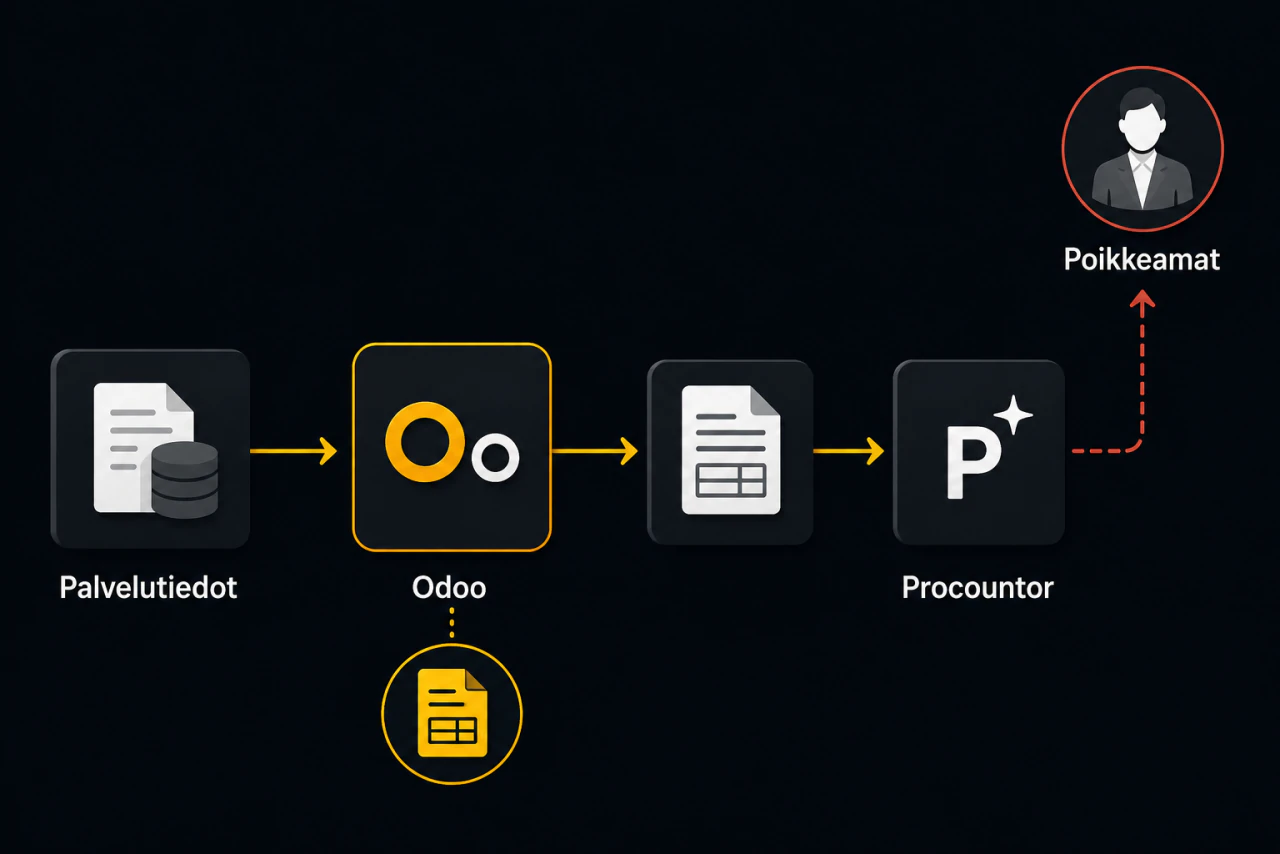
A business saved two working days a month by automating service data retrieval, invoice creation and transfer to its accounting system.
Manual work every billing cycle
Each month, staff checked each customer’s service scope in a separate system and created invoices by hand in Odoo, their enterprise resource planning system.
They then copied invoice details into Procountor and checked both systems, repeating the work every month.
Automation across systems
Rutirob’s automation retrieves each customer’s service scope, creates the invoice in Odoo and transfers the invoice data to Procountor.
Standard invoices need no manual data transfer. People handle only the exceptions.
Two working days saved per month
The customer keeps Odoo and Procountor. Automation transfers invoice data between them.
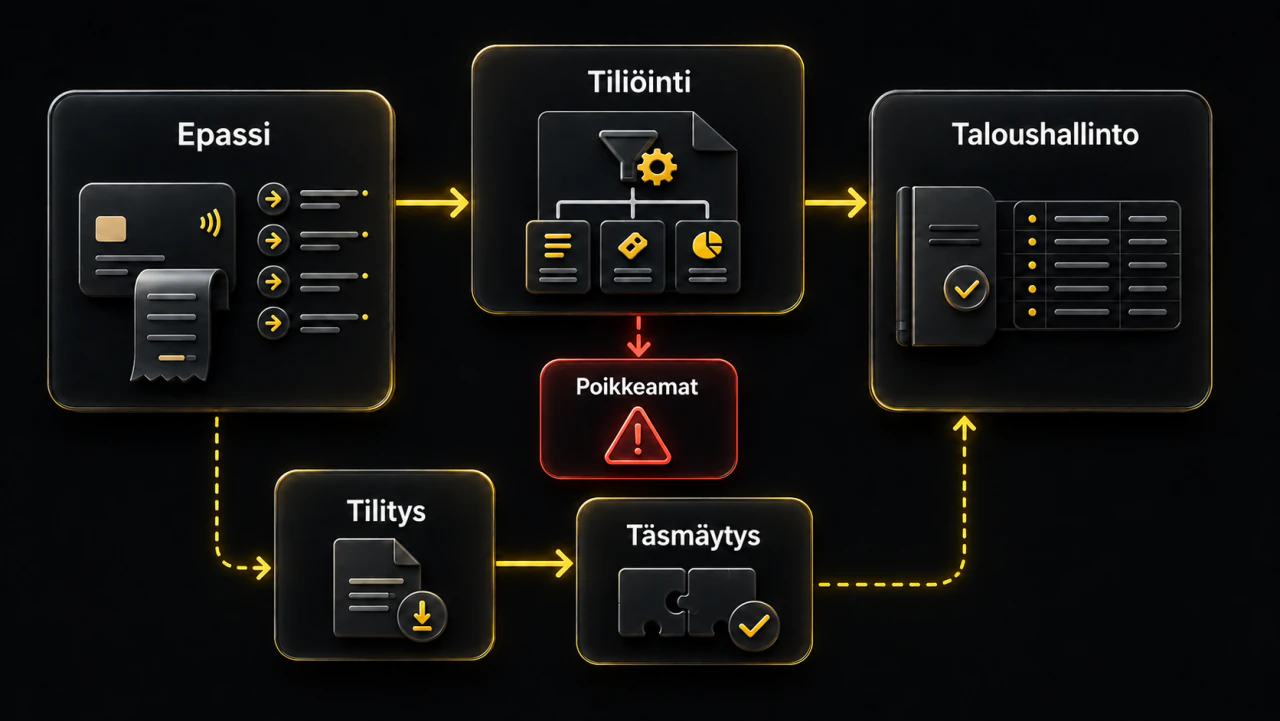
A service business saves several hours a month by automating Epassi account coding and reconciliation. The user starts each run; uncertain transactions go for human review.
Payments entered one by one
Staff entered and coded every Epassi payment by hand, taking considerable time each month.
Coding and reconciliation by agreed rules
The user starts the automation, which retrieves Epassi payments, codes them under agreed rules and posts them to the accounting system.
Reconciliation matches Epassi transactions against the settlement paid to the service provider.
Only transactions that can be processed reliably reach the accounting system. All others go for human review.
Several hours saved per month
The user controls each run. Exceptions are reviewed before processing.
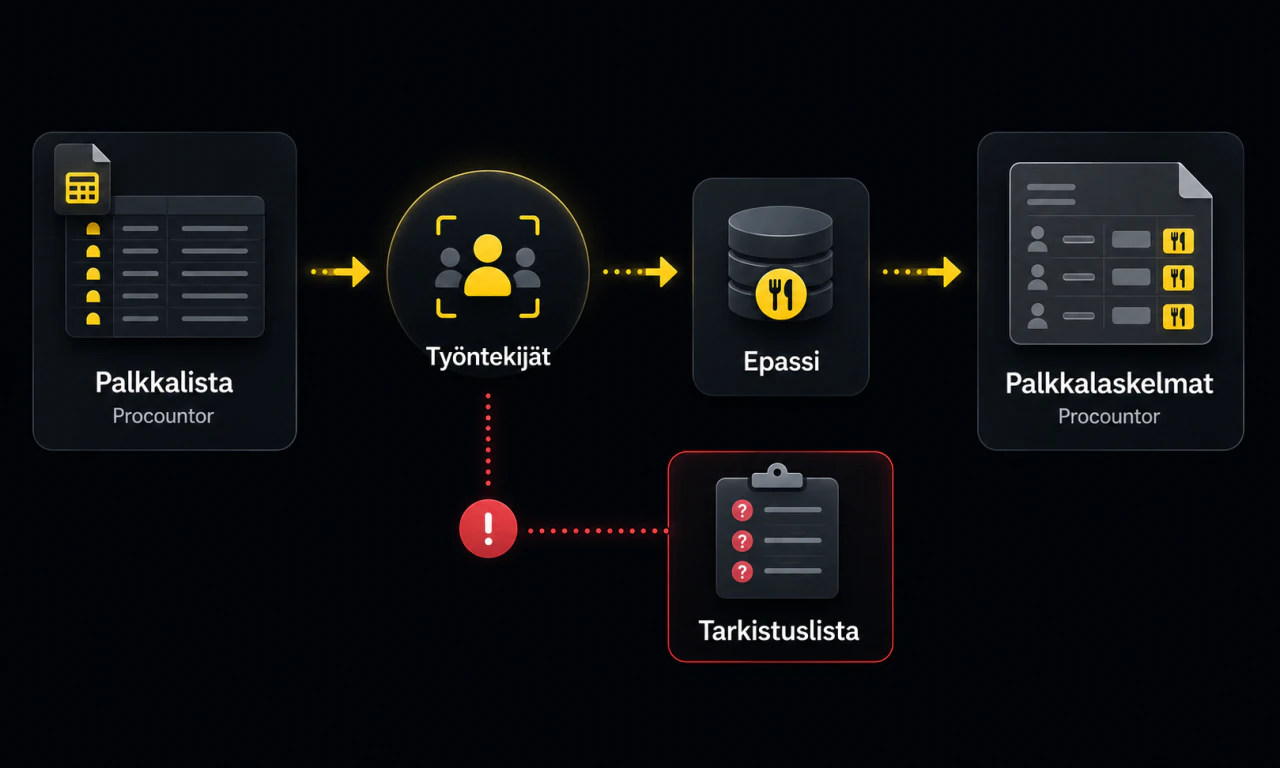
An employer reduced payroll processing time by automating lunch benefit data retrieval from Epassi and entry on Procountor payslips.
Benefit data entered by hand
Epassi lunch benefit data was entered manually in Procountor for each employee.
Matching and copying errors made this slow process worse. Investigating and correcting them took time and delayed payroll preparation.
Benefit data retrieved directly from Epassi
The payroll administrator creates a Procountor payroll list and starts Rutirob’s Epassi tool.
The tool retrieves the listed employees from Procountor and their lunch benefits from Epassi, then adds each benefit amount to the corresponding payslip.
Uncertain matches are not added automatically. They go to the payroll administrator’s review list.
Faster, error-free payroll processing
The customer keeps Epassi and Procountor. The tool transfers benefit data between them and leaves uncertain matches for the payroll administrator.
Help customers find information and send enquiries to the right place. People maintain the content and handle enquiries.
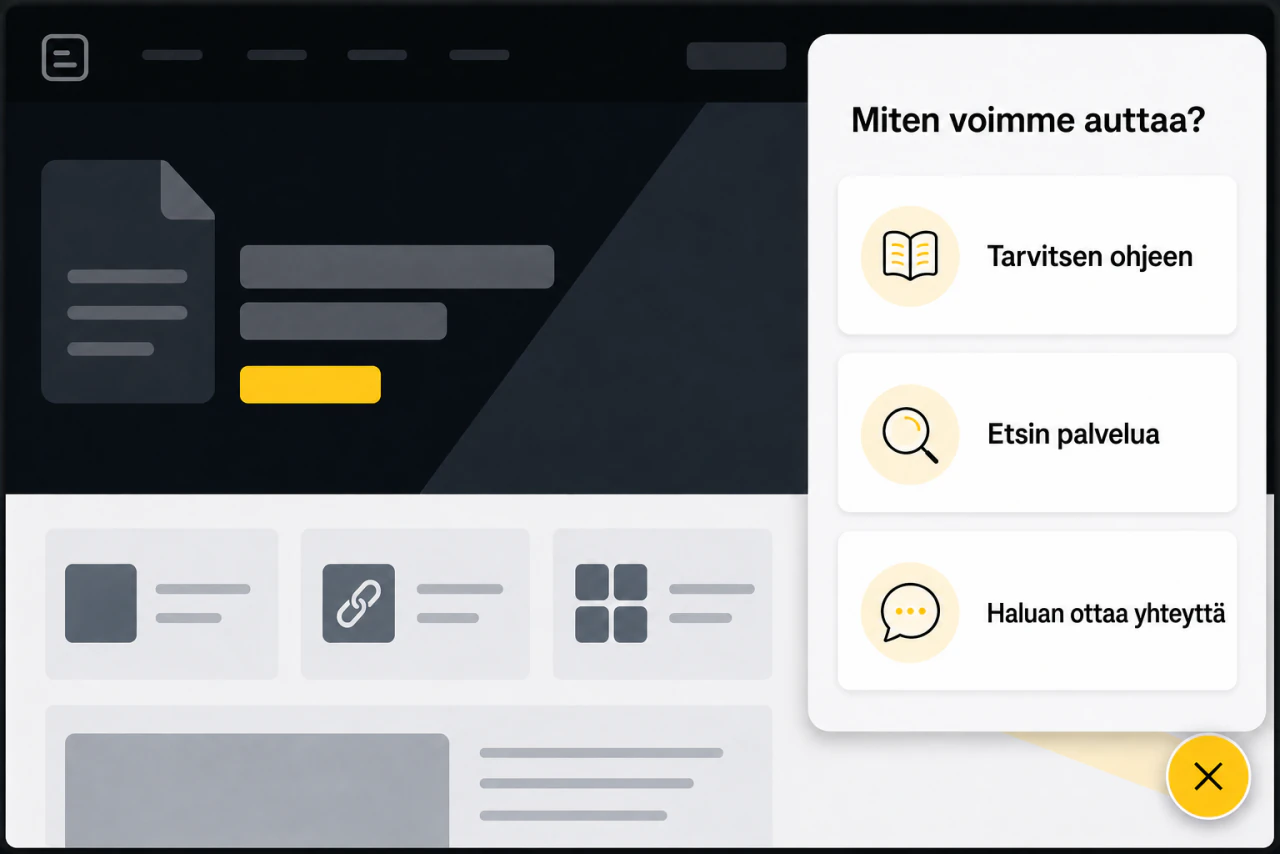
A service business’s customers struggled to find information on its website. When access to an external system ended, Rutirob built a replacement decision path in the customer’s WordPress site.
Information was hard to find
The information was on the website, but customers struggled to find the right instructions, service or contact option.
Access to the previous system had ended, so a replacement was needed.
A guided path through the options
A floating button opens choice cards over the website. Visitors select the options that fit their situation.
Each choice leads to relevant:
The same path and floating button work on mobile.
The administrator updates screens, choices and links in WordPress without writing code.
A guided journey on the customer’s own site
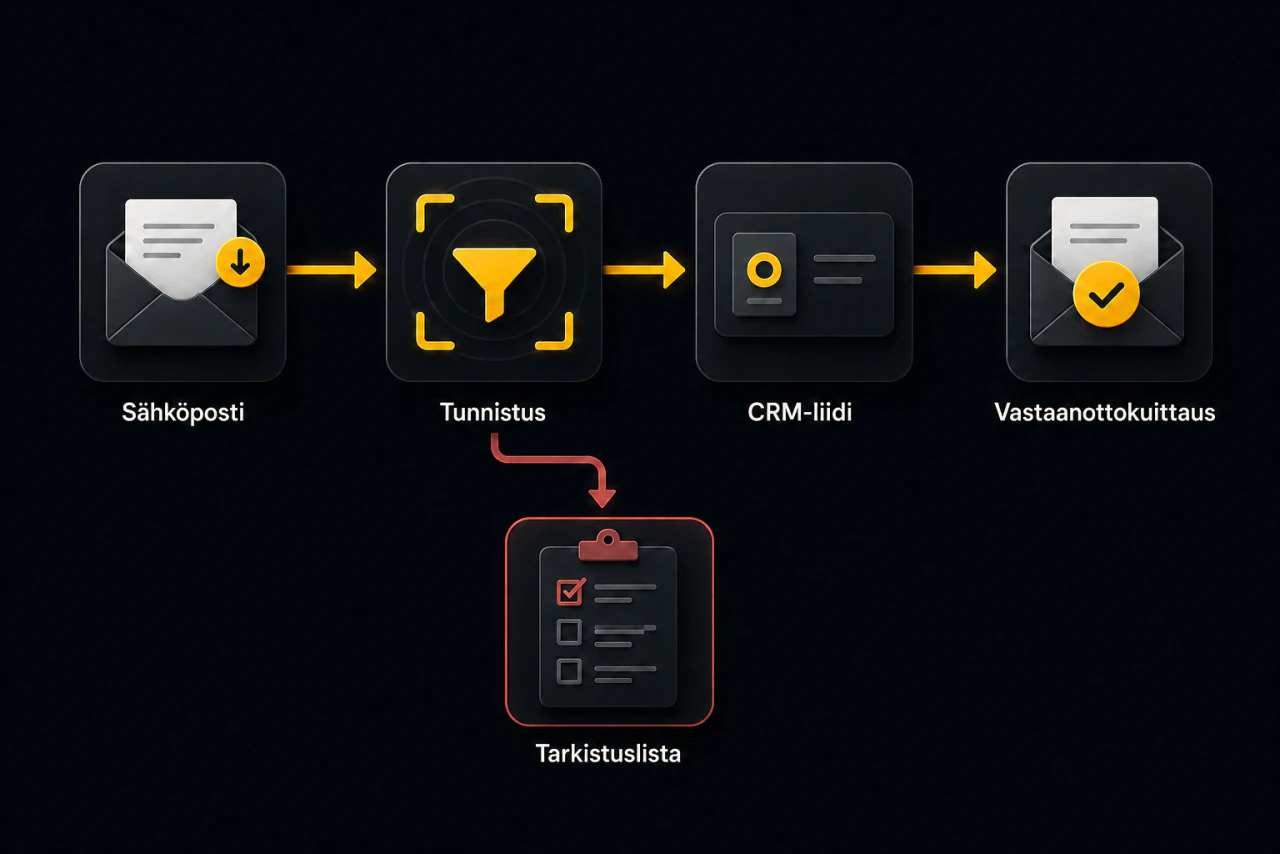
A B2B company receives website enquiries by email. After automating lead creation under agreed criteria, it reported faster handling and no more messages accidentally left unrecorded.
Every enquiry entered by hand
An employee read every enquiry email and created a CRM lead manually. Some messages were accidentally left unrecorded.
Manual entry delayed responses. Unrecorded enquiries could go unanswered and were missing from sales tracking and reports.
Automatic CRM leads from recognised enquiries
Agreed criteria distinguish website enquiries from other emails.
Each lead records:
Uncertain details or an existing CRM record prevent automatic lead creation. The message goes to a manual review list.
New leads enter the sales team’s normal workflow. An automatic reply confirms receipt and tells the sender their enquiry will be handled as soon as possible.
Enquiries included in sales tracking
The customer reported:
Automation identifies, records and acknowledges enquiries. The sales team handles them.
Monitoring and a shared view highlight exceptions and future needs. People assess alerts and forecasts and decide what to do.
A digital services business introduced continuous system and backup monitoring. Alert and event logs confirm earlier detection of incidents and failed backups.

Incidents could remain undetected
Separate checks made incidents and failed backups easy to miss. There was no current confirmation that backups could be restored.
Continuous system and backup monitoring
The solution automatically monitors:
Incidents and failed backups alert the customer’s administrators. Monitoring does not fix them automatically.
Monitoring is continuous. Alerts are handled during agreed service hours.
Backups are verified by test restores. A successful test guarantees that the tested backup can be restored when needed.
Earlier detection of incidents and failed backups
Alert and event logs confirm earlier detection of incidents and failed backups.
One view shows current stock, consumption rate and when a critical consumable is expected to run out. The business can plan replenishment around actual use.

Known stock levels, unknown future demand
Staff compiled stock figures from several systems. They knew current quantities but had no forecast of consumption rate or when stock would run out.
Without a forecast, they risked replenishing too early or waiting until stock was nearly exhausted.
Stock, consumption and replenishment in one view
Data from several systems feeds a time-series database. A web application brings together:
A mobile app shows current stock levels. The system warns when stock is expected to run out soon.
Alerts do not trigger orders. A person assesses the need, decides and places the order.
Replenishment based on actual use
Current stock data and forecasts support replenishment decisions. A person remains responsible for ordering.
Integrations and data transfer
We check for an existing connection, build only what is missing and maintain the agreed integration as the systems change.
Tell us where finding, checking or transferring information between systems takes time, leads to errors or leaves someone without the information they need.
We will review it together and explore ways to speed up the work, automate it or make it more reliable.